Global Credit Risk Data
Bring Creditsafe’s global business credit data directly into HubSpot. Automatically enrich company records, assess risk, and make faster, data‑driven decisions with real‑time financial and compliance insights.
Introduction
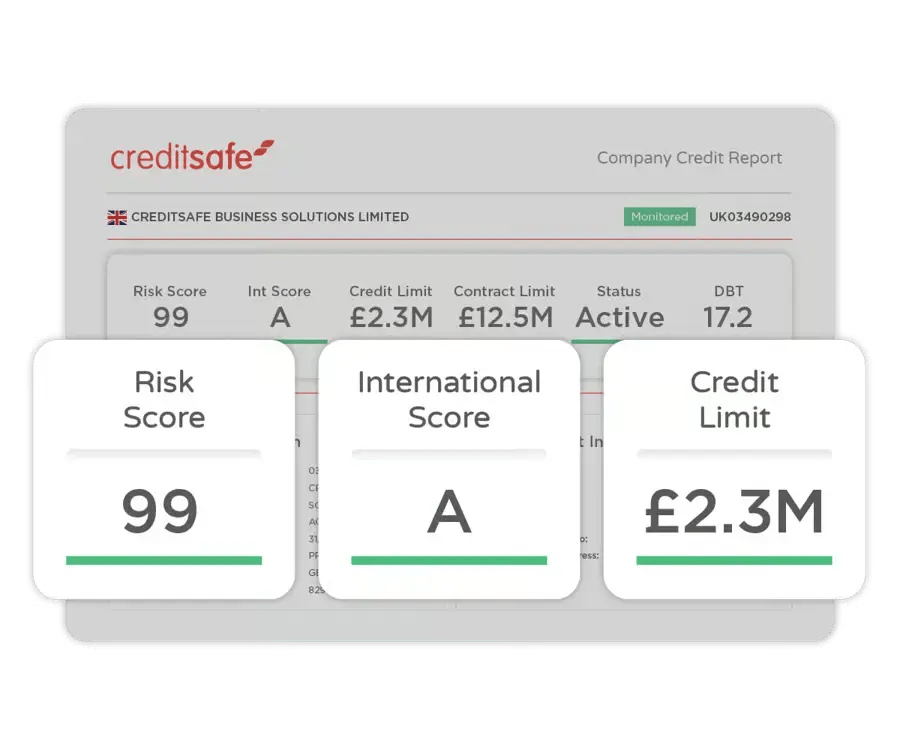
The Creditsafe App by Leapware brings Creditsafe’s global business intelligence network directly into HubSpot, giving your teams instant access to reliable company credit data, financial insights, and risk indicators without leaving the CRM. Creditsafe is the world’s most‑used provider of online business credit reports, offering accurate, up‑to‑date information on more than 430 million companies worldwide.
With this integration, HubSpot users can enrich company records automatically, qualify leads faster, and make better‑informed decisions at every stage of the customer lifecycle. Designed for sales, finance, operations, and compliance teams, the app embeds Creditsafe’s trusted credit scores, limits, director information, and compliance checks directly into HubSpot workflows.
Whether you’re onboarding new customers, assessing credit risk, or targeting high‑quality prospects, the Creditsafe App ensures your team always works with current, actionable data, helping you increase sales, reduce exposure to credit risk, and protect your business with confidence.
Check the introduction video for a quick overview of the Creditsafe app for HubSpot
Prerequisites
HubSpot Account Requirements
The Creditsafe App works with all HubSpot subscription levels, including Free. No specific tier is required. Because the app enriches company records, the portal must have access to Companies, which is included in every HubSpot account by default.
User Permissions
To install the app, the following permissions are required:
-
Super Admin or permission to install Marketplace apps
-
Permission to view and edit Companies
-
Permission to manage properties and property settings
Creditsafe Requirements
Using the app requires an active Creditsafe contract with API access.
During setup, the app will request:
-
Username (your Creditsafe email address)
-
Password
-
Customer Number
These credentials are used solely to establish a secure connection to the Creditsafe API and retrieve company information.
App Access & Permissions
Companies
The app needs access to view and update company records and manage custom properties. This is required to enrich HubSpot companies with Creditsafe data.
Files
The app may store or retrieve files, such as downloaded PDF reports, using HubSpot’s File Manager.
Basic Account Information
The app reads basic account details (such as the primary domain and user emails) to validate licensing and link Creditsafe usage to the correct HubSpot portal.
Installation
Installing the Creditsafe App
Install the app using the dedicated installation link:
https://creditsafe.leapware.app/hubspot/install
The installation follows HubSpot’s standard OAuth flow. After selecting your HubSpot account and approving the required permissions, you will be redirected to the setup screen where you can enter your Creditsafe credentials.
You may add screenshots or step‑by‑step visuals here.
Custom Properties Created During Installation
During installation, the app automatically creates approximately 60 custom properties on the Company object. These fields store Creditsafe data such as:
-
Credit scores
-
Credit limits
-
Risk indicators
-
Company status
-
Director information
-
Financial and compliance data
These properties are created with consistent naming and can be used in:
-
Workflows
-
Lists
-
Reports
-
Custom views
No existing HubSpot properties are modified.
Initial Setup
Setting the App as the Default Right‑Panel View
You can configure the Creditsafe App to appear at the top of the right‑hand sidebar on Company records.
This ensures Creditsafe data is always visible when viewing a company.
This preference is user‑specific and does not affect other team members.
Using the Settings Page
Viewing Subscription Details
The Settings page shows key information about your Creditsafe subscription, including:
-
Username
-
Customer Number
-
API connection status
-
Subscription type (if available)
This helps verify that the correct Creditsafe account is connected.
Selecting the Report Language
You can choose the preferred language for Creditsafe reports. Currently supported:
-
English
-
Dutch
More languages will be added in future releases.
App Interface Language
The app interface supports:
-
English
-
Dutch
The interface language is determined automatically based on your HubSpot user language settings.
If your HubSpot language is Dutch, the app displays in Dutch.
Otherwise, it defaults to English.
Additional interface languages will be added over time.
Supported Countries
The Creditsafe App currently supports company reports and enrichment for:
-
Belgium
-
Denmark
-
France
-
Germany
-
Ireland
-
Luxembourg
-
Netherlands
-
Norway
-
United Kingdom
-
Sweden
Upcoming Countries
Soon to be added:
-
Italy
-
Japan
-
Mexico
For Japan and Mexico, each report costs 2 credits, including the PDF.
More countries will be added as Creditsafe expands API coverage.
Using the App
Searching for a Company
The search function is used to locate the correct Creditsafe company and link it to the HubSpot company record. This link connects:
-
the HubSpot Company ID, and
-
the Creditsafe Company ID.
This link must exist before a report can be requested.
Country Required for Search
Creditsafe requires a country name or country code for every search.
If no country is available on the HubSpot record, the app will prompt you to select one using advanced search.
Advanced Search
Advanced search allows you to refine your query using additional fields. Available fields vary by country and may include:
-
Registration number
-
VAT number
-
Postal code
-
City
-
Street address
-
Office type
-
Status
-
Industry codes
Advanced search is optional but recommended when searching for companies with common names or incomplete data.
Search Results
After submitting a search, the app displays a list of matching companies returned by Creditsafe. This list typically includes:
-
Company name
-
Address
-
Registration number
-
Country
Searching is free — Creditsafe does not charge credits for search requests.
You can review the results and select the correct company.
Creating the Link
After selecting a company, you can choose between two actions:
1. Create the Link Only
This option links the HubSpot company to the Creditsafe company without requesting a report.
Useful when:
-
You want to prepare records for later enrichment
-
You want to avoid consuming credits immediately
-
You plan to retrieve reports via workflows
2. Create the Link and Request the Report
This option:
-
Creates the link
-
Immediately retrieves the Creditsafe report
-
Updates all Creditsafe custom properties on the HubSpot record
Retrieving a report uses 1 credit, or 2 credits for Japan and Mexico.
After Linking
Once linked:
-
The Creditsafe company ID is stored on the HubSpot record
-
You can request or refresh the report at any time
-
Creditsafe properties can be used in workflows, lists, and reports
-
The link remains until manually removed
The app only updates the properties it created and does not modify other HubSpot fields.
Custom properties
The Creditsafe App by Leapware automatically creates approximately 60 custom properties on the Company object during installation. We thoughtfully engineer our apps so your existing HubSpot properties remain completely untouched.
The custom properties are grouped into logical sections to keep your CRM organized and to provide a reliable, stable foundation for your custom workflows, lists, and reporting.
Below is the complete list of properties, organized by their respective HubSpot property group.
Creditsafe – Identification
These fields store the core identifiers used to link a HubSpot company to a Creditsafe company and track report retrievals.
|
Property Label
|
Internal Name
|
Field Type
|
|---|---|---|
|
Creditsafe Report ID
|
crs_correlation_id |
Single-line text
|
|
Creditsafe Company ID
|
crs_company_id |
Single-line text
|
|
Creditsafe HubSpot CompanyID
|
crs_hubspot_companyid |
Single-line text
|
|
Creditsafe Report Language
|
crs_report_language |
Single-line text
|
|
Creditsafe Date Last Report
|
crs_date_retrieved |
Date picker
|
|
Creditsafe PDF
|
crs_pdf_file |
File
|
Creditsafe – Company Summary
These fields provide a high-level overview of the company as reported by Creditsafe.
|
Property Label
|
Internal Name
|
Field Type
|
|---|---|---|
|
Creditsafe Business Name
|
crs_business_name |
Single-line text
|
|
Creditsafe Company Registration Number
|
crs_company_registration_number |
Single-line text
|
|
Creditsafe GGS ID
|
crs_ggs_id |
Single-line text
|
|
Creditsafe Country
|
crs_country |
Single-line text
|
|
Creditsafe LEI Number
|
crs_lei_number |
Single-line text
|
|
Creditsafe Main Activity Code
|
crs_main_activity_code |
Single-line text
|
|
Creditsafe Industry Sector
|
crs_industry_sector |
Single-line text
|
|
Creditsafe Main Activity Description
|
crs_main_activity_description |
Single-line text
|
|
Creditsafe Main Activity Classification
|
crs_main_activity_classification |
Single-line text
|
|
Creditsafe Status
|
crs_status |
Single-line text
|
|
Creditsafe Status Description
|
crs_status_description |
Single-line text
|
|
Creditsafe Provider Status
|
crs_status_provider_status |
Single-line text
|
|
Creditsafe Provider Code
|
crs_status_provider_code |
Single-line text
|
|
Creditsafe Active
|
crs_status_isactive |
Single checkbox
|
|
Creditsafe Number of Employees
|
crs_employee_count |
Single-line text
|
|
Creditsafe Number of Employees (Year)
|
crs_employee_count_year |
Single-line text
|
Creditsafe – Company Credit Rating
These fields store Creditsafe’s financial risk assessment, credit limits, historical rating data, and payment behavior.
|
Property Label
|
Internal Name
|
Field Type
|
|---|---|---|
|
Creditsafe Registered Company Name
|
crs_registered_company_name |
Single-line text
|
|
Creditsafe VAT Number
|
crs_vat_registrationnumber |
Single-line text
|
|
Creditsafe VAT Registration Date
|
crs_vat_registrationdate |
Single-line text
|
|
Creditsafe Registration Date
|
crs_company_registration_date |
Date picker
|
|
Creditsafe Start Date Operations
|
crs_operations_startdate |
Date picker
|
|
Creditsafe Commercial Court
|
crs_commercial_court |
Single-line text
|
|
Creditsafe Legal Form Common Code
|
crs_legalform_common_code |
Single-line text
|
|
Creditsafe Legal Form Provider Code
|
crs_legalform_provider_code |
Single-line text
|
|
Creditsafe Legal Form Provider Description
|
crs_legalform_provider_description |
Single-line text
|
|
Creditsafe Office Type
|
crs_office_type |
Single-line text
|
|
Creditsafe Ownership Type
|
crs_ownership_type |
Single-line text
|
|
Creditsafe Address Type
|
crs_address_type |
Single-line text
|
|
Creditsafe Street
|
crs_address_street |
Single-line text
|
|
Creditsafe Housenumber
|
crs_address_housenumber |
Single-line text
|
|
Creditsafe Housenumber Addition
|
crs_address_housenumber_addition |
Single-line text
|
|
Creditsafe City
|
crs_address_city |
Single-line text
|
|
Creditsafe Postal Code
|
crs_address_postalcode |
Single-line text
|
|
Creditsafe Province
|
crs_address_province |
Single-line text
|
|
Creditsafe Country
|
crs_address_country |
Single-line text
|
|
Creditsafe Phone
|
crs_address_telephone |
Phone number
|
|
Creditsafe Direct Marketing Opt Out
|
crs_directmarketing_optout |
Single checkbox
|
|
Creditsafe Direct Marketing Opt In
|
crs_directmarketing_optin |
Single checkbox
|
Creditsafe – Company Information
These fields store detailed company information such as legal form, VAT data, registered address, and marketing preferences.
|
Property Label
|
Internal Name
|
Field Type
|
|---|---|---|
|
Creditsafe Registered Company Name
|
crs_registered_company_name |
Single-line text
|
|
Creditsafe VAT Number
|
crs_vat_registrationnumber |
Single-line text
|
|
Creditsafe VAT Registration Date
|
crs_vat_registrationdate |
Single-line text
|
|
Creditsafe Registration Date
|
crs_company_registration_date |
Date picker
|
|
Creditsafe Start Date Operations
|
crs_operations_startdate |
Date picker
|
|
Creditsafe Commercial Court
|
crs_commercial_court |
Single-line text
|
|
Creditsafe Legal Form Common Code
|
crs_legalform_common_code |
Single-line text
|
|
Creditsafe Legal Form Provider Code
|
crs_legalform_provider_code |
Single-line text
|
|
Creditsafe Legal Form Provider Description
|
crs_legalform_provider_description |
Single-line text
|
|
Creditsafe Office Type
|
crs_office_type |
Single-line text
|
|
Creditsafe Ownership Type
|
crs_ownership_type |
Single-line text
|
|
Creditsafe Address Type
|
crs_address_type |
Single-line text
|
|
Creditsafe Street
|
crs_address_street |
Single-line text
|
|
Creditsafe Housenumber
|
crs_address_housenumber |
Single-line text
|
|
Creditsafe Housenumber Addition
|
crs_address_housenumber_addition |
Single-line text
|
|
Creditsafe City
|
crs_address_city |
Single-line text
|
|
Creditsafe Postal Code
|
crs_address_postalcode |
Single-line text
|
|
Creditsafe Province
|
crs_address_province |
Single-line text
|
|
Creditsafe Country
|
crs_address_country |
Single-line text
|
|
Creditsafe Phone
|
crs_address_telephone |
Phone number
|
|
Creditsafe Direct Marketing Opt Out
|
crs_directmarketing_optout |
Single checkbox
|
|
Creditsafe Direct Marketing Opt In
|
crs_directmarketing_optin |
Single checkbox
|
Frequently Asked Questions (FAQ)
Use the installation link: https://creditsafe.leapware.app/hubspot/install
Follow the HubSpot OAuth flow and enter your Creditsafe credentials.
Yes.
The current version requires an active Creditsafe subscription with API access.
Leapware will release an additional app in 2026 that allows requesting reports without a Creditsafe subscription.
Your Customer Number helps identify your Creditsafe account and is used in communication with Creditsafe for support, validation, and subscription‑related questions.
You cannot change these details inside the app. To update your login information, sign in to your Creditsafe customer portal.
The app is free for Creditsafe subscribers.
Creditsafe charges per report:
-
1 credit per report
-
+1 credit for the PDF
For Japan and Mexico, each report costs 2 credits, including the PDF.
Go to the app’s Settings page and select your preferred language. Currently supported: English and Dutch.
The interface language is based on your HubSpot user language settings. Supported: English and Dutch.
Default: English.
Currently supported:
-
Belgium
-
Denmark
-
France
-
Germany
-
Ireland
-
Luxembourg
-
Netherlands
-
Norway
-
United Kingdom
- Sweden
Yes. Upcoming:
-
Italy
-
Japan
- Mexico
No. The app will never delete companies.
Although the permission is included in the scope requirements, the app does not use it.
Not currently. Future versions may support creating related companies (e.g., group structures, parent/child relationships).